简介
这一款基于液位高度检测应用而设计的超声波液位传感器,针对传统超声波传感器普遍存在的盲区大、测量角度宽、响应迟缓及安装不便等行业痛点。该传感器突破性地实现了1.5cm的极小标准盲区,并支持通过指令将最远量程灵活设定在30~300cm之间(出厂默认200cm)。传感器整体采用微型防尘防水结构设计,防护等级高达IP67。支持3.3V ~12V的宽电压输入,并在输入/输出接口处集成了符合 IEC61000-4-2标准的静电防护器件(抗静电达+4K/8K),确保在-25℃~+65℃的恶劣温度循环中维持极高可靠性。
6种算法模式可设
传感器内置多达6种底层算法模式(包含实时值、3级液面晃动过滤、小台阶过滤及高灵敏度模式),有效过滤水面波浪、泡沫带来的误判,以适应不同的液位监测场景。
传感器默认工作为算法模式1,以100ms为周期自动工作,可以通过写modbus协议设置算法模式,其中算法模式0、4、5为实时值输出,算法模式1、2、3为处理值输出。实时值输出,响应时间为100ms;处理值输出数据更稳定,响应时间≥2s。
9个信号等级可设
传感器信号等级可设置为1~9级,适应不同量程和角度需求,默认第五级,可测量程越200cm;等级越高,检测角度越大,感应越灵敏,可测量程就越远。
支持5个等级电源降噪
电源降噪等级分为1~5级(默认为1),使其能够从容应对电池直供、长线缆USB供电或高噪声开关电源等各类复杂电气环境。等级越高,对噪声抑制越大,同时整体角度也会受影响,等级越高角度受影响情况更大。
特性
- 盲区低至1.5cm,可设置30~300cm范围内任意值作为最远量程
- 内置液面晃动过滤、小台阶过滤、高灵敏度等6种液位算法模式可设置
- 9 个信号等级可设置,适配不同量程和角度的需求
- 内置电源降噪功能,可支持5级降噪等级设置
- IP67 防水防尘,抗静电达IEC61000-4-2标准,支持3.3V-12V宽压运行
应用场景
- 无土栽培营养液监测
- 箱内消毒液液位监测
- 绿植观赏箱营养液监测
- 房车水箱污水箱水位监测
技术规格
- 工作电压:3.3~12V
- 待机电流:≤5uA
- 平均工作电流:≤9mA
- 盲区距离:≤1.5cm
- 测量范围:30~300cm可设(默认200cm)
- 精度:0.5+(S*0.3%)cm
- 响应时间:实时值100ms,处理值≥2000ms
- 上电工作时间:≤650ms
- 工作周期:100ms
- 输出方式:UART自动(Modbus协议)
- 温度补偿:有
- 角度:10~50°
- 工作温度:-25°C~65°C
- 工作湿度:65~80%RH
- 存储温度:-30°C~80°C
- 存储湿度:65~90%RH
- 静电防护等级:+4K/8K (V)
- 防护等级:IP67
- 外壳材料:PC材质
引脚示意图
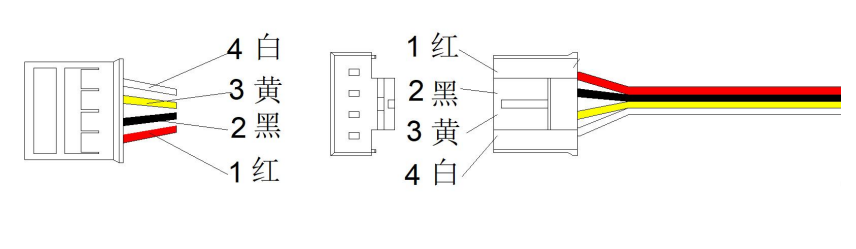
| 线序 | 颜色 | 功能描述 |
|---|---|---|
| PIN1 | 红线 | VCC |
| PIN2 | 黑线 | GND |
| PIN3 | 黄线 | RX |
| PIN4 | 白线 | TX |
尺寸图
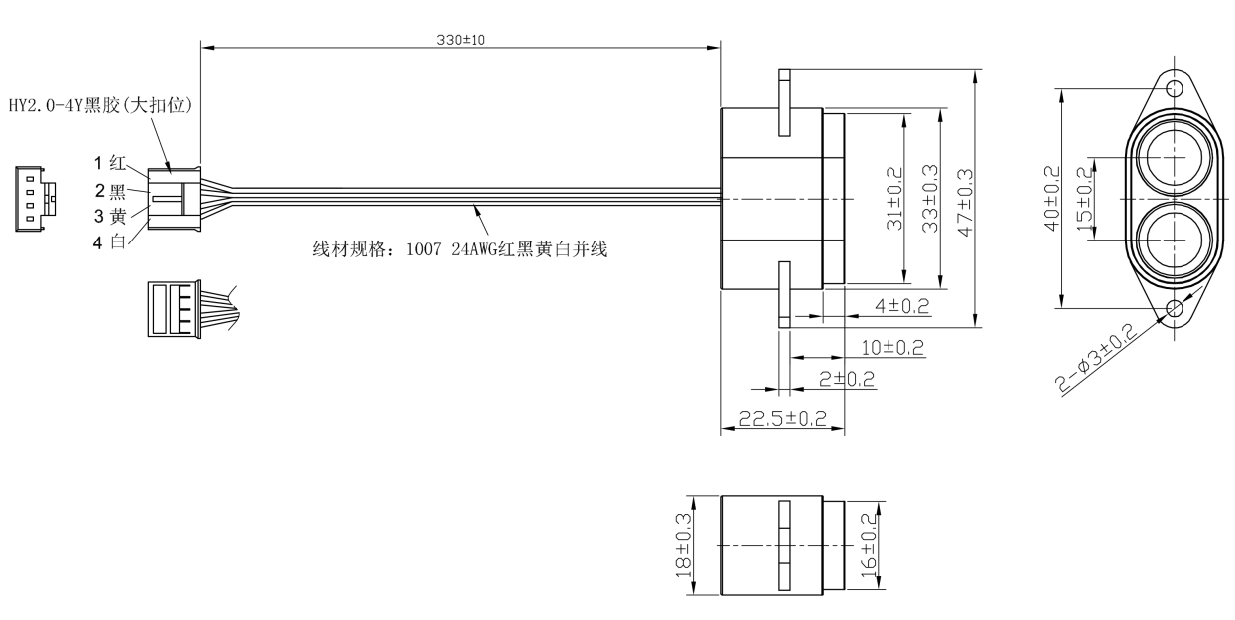
安装方式及开孔建议
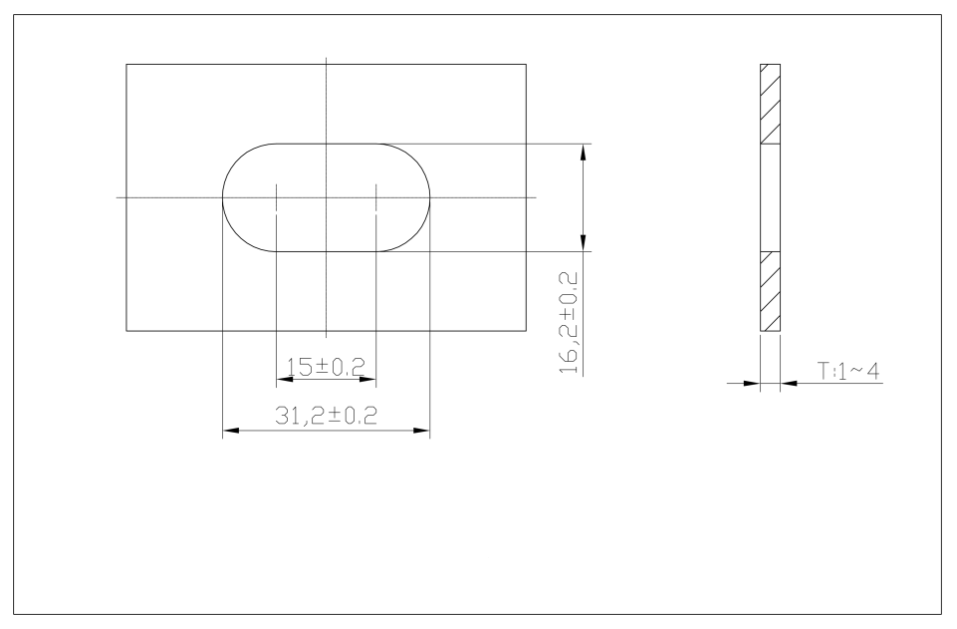
传感器推荐使用顶部固定安装检测液位高度,开孔尺寸参考下图
接入Arduino使用教程
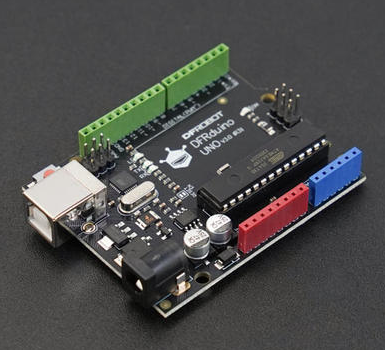
硬件准备
- Arduino UNO R3开发板 x1
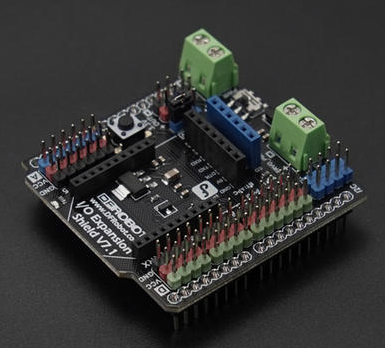
- Arduino UNO IO 传感器扩展板 x1
- 超声波液位传感器 x1
- 4PIN传感器转接线 x1
软件准备
- 下载Arduino IDE: 点击下载Arduino IDE
- 该示例代码兼容UNO R3、Mage2560、ESP32开发板
硬件连接
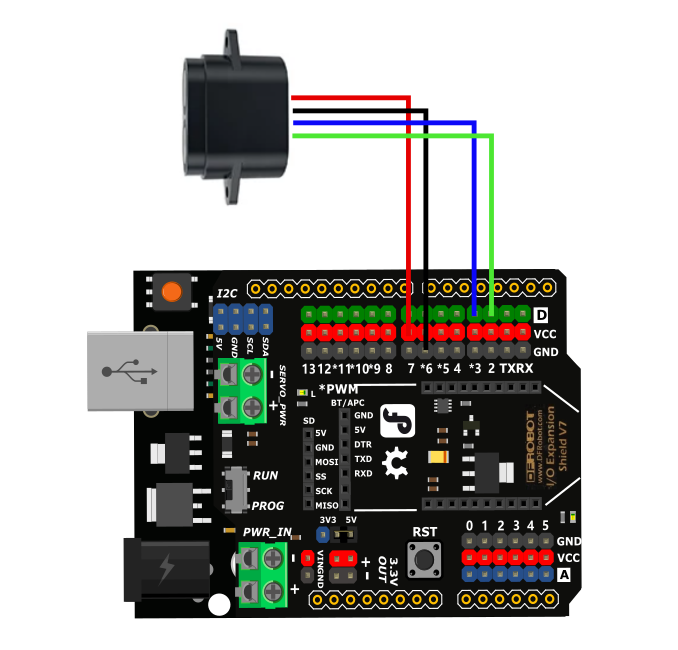
| 传感器+4Pin转接线 | Arduino UNO | Mega2560 | ESP32 |
|---|---|---|---|
| Red wire(+) | 5V | 5V | 5V |
| Black wire(-) | GND | GND | GND |
| Blue wire (RX) | D3 | D18 | D17 |
| Green wire (TX) | D2 | D19 | D16 |
实时值输出演示代码
传感器推荐顶部固定安装,烧录代码前需修改实际的安装高度,默认安装高度为2m,该示例代码输出实时值,可以实时监测液位高度,没有经过任何算法处理,但响应速度快,适用于液面无晃动的液位检测场景。
// ---------------- Cross-Platform Serial Configuration ----------------
#if defined(__AVR_ATmega2560__)
// Arduino Mega 2560: Use hardware serial port Serial1
// Sensor TX connects to Mega Pin 19
// Sensor RX connects to Mega Pin 18
#define sensorSerial Serial1

#elif defined(ESP32)
// ESP32: Manually instantiate hardware serial port; compatible with all models including C3/S2/S3/WROOM, etc.
#include <HardwareSerial.h>
HardwareSerial mySensorSerial(1);  // Consistently use internal UART 1
#define sensorSerial mySensorSerial

#else
// Arduino UNO: Software serial port
// Sensor TX connects to UNO Pin 2
// Sensor RX connects to UNO Pin 3
#include <SoftwareSerial.h>
SoftwareSerial mySerial(2, 3);
#define sensorSerial mySerial
#endif
// ------------------------------------------------

uint8_t Com[8] = { 0x01, 0x03, 0x01, 0x01, 0x00, 0x02, 0x94, 0x37 };  //实时值,无算法
int stallationHeight = 2000, emptyHeight, WaterLevel;
float tem;

void setup() {
  Serial.begin(115200);

  // Print a line of plain English text for testing. If this line appears clearly and without garbled characters,
  // it indicates that communication between the computer and the development board is fully functional! Serial.println("");
  Serial.println("--- System Start ---");

// Initialize the sensor serial port for different development boards
// (The sensor's baud rate must remain at 115200—do not change it)
#if defined(ESP32)
  // ESP32 specific pins: RX connected to 17, TX connected to 16;
  // pins can be customized based on the specific board model
  sensorSerial.begin(115200, SERIAL_8N1, 16, 17);
#else
  // UNO and Mega 2560
  sensorSerial.begin(115200);
#endif
}

void loop() {
  Read_Realtime();
  Serial.print(" TEM: ");
  Serial.print(tem, 1);
  Serial.println(" °C");
  Serial.print(" 安装高度: ");
  Serial.print(stallationHeight);
  Serial.println(" mm");
  Serial.print(" 空高: ");
  Serial.print(emptyHeight);
  Serial.println(" mm");
  Serial.print(" 液位高度: ");
  Serial.print(WaterLevel);
  Serial.println(" mm");
  Serial.println(" ");
  delay(500);
}

void Read_Realtime(void) {
  uint8_t Data[10] = { 0 };
  uint8_t ch = 0;
  bool flag = 1;
  long timeStart = millis();
  long timeStart1 = 0;
  while (flag) {

    if ((millis() - timeStart1) > 100) {
      while (sensorSerial.available() > 0) {
        sensorSerial.read();
      }
      sensorSerial.write(Com, 8);
      timeStart1 = millis();
    }

    if ((millis() - timeStart) > 1000) {
      Serial.println("Time out");
      return;
    }

    if (readN(&ch, 1) == 1) {
      if (ch == 0x01) {
        Data[0] = ch;
        if (readN(&ch, 1) == 1) {
          if (ch == 0x03) {
            Data[1] = ch;
            if (readN(&ch, 1) == 1) {
              if (ch == 0x04) {
                Data[2] = ch;
                if (readN(&Data[3], 6) == 6) {
                  if (CRC16_2(Data, 7) == (Data[7] * 256 + Data[8])) {
                    emptyHeight = Data[3] * 256 + Data[4];
                    tem = (Data[5] * 256 + Data[6]) / 10.0;
                    WaterLevel = stallationHeight - emptyHeight;
                    flag = 0;
                  }
                }
              }
            }
          }
        }
      }
    }
  }
}

uint8_t readN(uint8_t *buf, size_t len) {
  size_t offset = 0, left = len;
  int16_t Tineout = 500;
  uint8_t *buffer = buf;
  long curr = millis();
  while (left) {
    if (sensorSerial.available()) {
      buffer[offset] = sensorSerial.read();
      offset++;
      left--;
    }
    if (millis() - curr > Tineout) {
      break;
    }
  }
  return offset;
}

unsigned int CRC16_2(unsigned char *buf, int len) {
  unsigned int crc = 0xFFFF;
  for (int pos = 0; pos < len; pos++) {
    crc ^= (unsigned int)buf[pos];
    for (int i = 8; i != 0; i--) {
      if ((crc & 0x0001) != 0) {
        crc >>= 1;
        crc ^= 0xA001;
      } else {
        crc >>= 1;
      }
    }
  }

  crc = ((crc & 0x00ff) << 8) | ((crc & 0xff00) >> 8);
  return crc;
}
结果
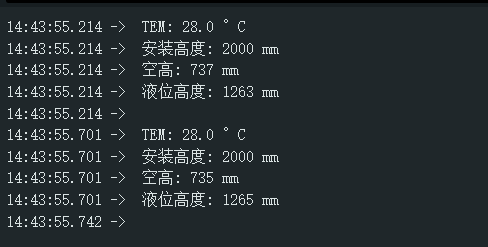
串口监视器选择115200,打印采集到的空高、液位高度和温度值。
算法模式1输出演示代码
烧录代码前需修改实际的安装高度,默认安装高度为2m,该示例代码输出处理值,经过算法模式1处理,可以实时监测液位高度,数据稳定,但是响应速度较慢,约≥2s左右响应,适用于有液面晃动的液位检测场景。
// ---------------- Cross-Platform Serial Configuration ----------------
#if defined(__AVR_ATmega2560__)
// Arduino Mega 2560: Use hardware serial port Serial1
// Sensor TX connects to Mega Pin 19
// Sensor RX connects to Mega Pin 18
#define sensorSerial Serial1

#elif defined(ESP32)
// ESP32: Manually instantiate hardware serial port; compatible with all models including C3/S2/S3/WROOM, etc.
#include <HardwareSerial.h>
HardwareSerial mySensorSerial(1);  // Consistently use internal UART 1
#define sensorSerial mySensorSerial

#else
// Arduino UNO: Software serial port
// Sensor TX connects to UNO Pin 2
// Sensor RX connects to UNO Pin 3
#include <SoftwareSerial.h>
SoftwareSerial mySerial(2, 3);
#define sensorSerial mySerial
#endif
// ------------------------------------------------

uint8_t Com[8] = { 0x01, 0x03, 0x01, 0x00, 0x00, 0x03, 0x04, 0x37 };  //处理值、算法模式1
int stallationHeight = 2000, emptyHeight, WaterLevel;
float tem;

void setup() {
  Serial.begin(115200);
// Initialize the sensor serial port for different development boards
// (The sensor's baud rate must remain at 115200—do not change it)
#if defined(ESP32)
  // ESP32 specific pins: RX connected to 17, TX connected to 16;
  // pins can be customized based on the specific board model
  sensorSerial.begin(115200, SERIAL_8N1, 16, 17);
#else
  // UNO and Mega 2560
  sensorSerial.begin(115200);
#endif
}

void loop() {
  Read_Processing();
  Serial.print(" TEM: ");
  Serial.print(tem, 1);
  Serial.println(" °C");
  Serial.print(" 安装高度: ");
  Serial.print(stallationHeight);
  Serial.println(" mm");
  Serial.print(" 空高: ");
  Serial.print(emptyHeight);
  Serial.println(" mm");
  Serial.print(" 液位高度: ");
  Serial.print(WaterLevel);
  Serial.println(" mm");
  Serial.println(" ");
  delay(2000);
}

void Read_Processing(void) {
  uint8_t Data[12] = { 0 };
  uint8_t ch = 0;
  bool flag = 1;
  long timeStart = millis();
  long timeStart1 = 0;
  while (flag) {

    if ((millis() - timeStart1) > 100) {
      while (sensorSerial.available() > 0) {
        sensorSerial.read();
      }
      sensorSerial.write(Com, 8);
      timeStart1 = millis();
    }

    if ((millis() - timeStart) > 1000) {
      Serial.println("Time out");
      return;
    }

    if (readN(&ch, 1) == 1) {
      if (ch == 0x01) {
        Data[0] = ch;
        if (readN(&ch, 1) == 1) {
          if (ch == 0x03) {
            Data[1] = ch;
            if (readN(&ch, 1) == 1) {
              if (ch == 0x06) {
                Data[2] = ch;
                if (readN(&Data[3], 8) == 8) {
                  if (CRC16_2(Data, 9) == (Data[9] * 256 + Data[10])) {
                    emptyHeight = Data[3] * 256 + Data[4];
                    tem = (Data[7] * 256 + Data[8]) / 10.0;
                    WaterLevel = stallationHeight - emptyHeight;
                    flag = 0;
                  }
                }
              }
            }
          }
        }
      }
    }
  }
}

uint8_t readN(uint8_t *buf, size_t len) {
  size_t offset = 0, left = len;
  int16_t Tineout = 500;
  uint8_t *buffer = buf;
  long curr = millis();
  while (left) {
    if (sensorSerial.available()) {
      buffer[offset] = sensorSerial.read();
      offset++;
      left--;
    }
    if (millis() - curr > Tineout) {
      break;
    }
  }
  return offset;
}

unsigned int CRC16_2(unsigned char *buf, int len) {
  unsigned int crc = 0xFFFF;
  for (int pos = 0; pos < len; pos++) {
    crc ^= (unsigned int)buf[pos];
    for (int i = 8; i != 0; i--) {
      if ((crc & 0x0001) != 0) {
        crc >>= 1;
        crc ^= 0xA001;
      } else {
        crc >>= 1;
      }
    }
  }

  crc = ((crc & 0x00ff) << 8) | ((crc & 0xff00) >> 8);
  return crc;
}
结果
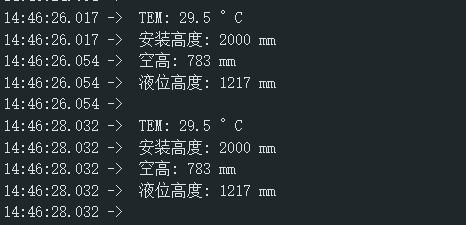
串口监视器选择115200,打印采集到的空高、液位高度和温度值。
更多资料下载
常见问题
- 空高显示-3mm时,表示未检测到液体
- 该传感器主要为液体检测场景设计,不推荐物体检测场景
- 设置量程时,信号等级也需要同步设置,否则角度无变化,新量程将无效
