简介
FP01 AI视觉识别传感器搭载了专用高算力计算芯片,并深度集成高性能红外成像摄像头系统。无论处于强光散射的复杂室外工况(非阳光直射),还是处于0Lux的极暗全黑环境,均能捕获高质量、对比度鲜明的生物特征图像,展现出极佳的全天候环境自适应能力。
FP01 AI视觉识别传感器本地固化了新一代 3D 活体人脸检测算法与皮下静脉掌纹/掌静脉双重生物识别算法。通过提取面部三维深度信息及手掌皮下静脉特性,实现了真正意义上的非接触式防伪身份验证,从根本上杜绝了利用高清照片、电子屏幕视频或立体面具进行伪造攻击的可能性。
FP01 AI视觉识别传感器采用了“零算力依赖”与“双模态数据流”设计。全量的数据采集、特征比对、密钥加密及数据库存取工作均在本地模组内部独立完成,对接入的第三方主控设备无任何算力吞吐要求。
FP01 AI视觉识别传感器通过标准 UART 接口对外输出高度抽象的识别状态及ID结果,方便嵌入式系统开发,同时支持UVC/UAC协议,能够以标准MJPEG视频流格式进行高帧率、低延迟的实时视频图像传输。通用性极强,对各种需要人脸、静脉掌纹等多种身份认证的新老产品都可以做进行升级。
特性
- 双模态防伪认证:原生支持静脉掌纹算法与 3D 活体检测技术
- 全天候光照适应性:实现完全黑暗、微光及室外非阳光直射环境下的精准、高敏识别能力
- 纯离线部署与零算力门槛:算法计算运行在模块内部,无需第三方主控移植繁琐的算法 SDK,大幅缩短产品研发与投产周期
- 大容量高速特征本地库:内置安全存储介质,支持就地存储500个人脸特征数据(ID范围 1-500)及300个掌纹掌静脉特征数据(ID范围501-800)
- 瞬时响应与高宽容度角度:系统冷启动识别时间控制在≤240ms 以内。面部识别角度支持左右及上下约 20 度的物理宽容度
应用场景
- 智能家居
- 智能门锁
- 自助零售支付终端
- 3D人脸掌纹支付系统
- 静脉掌纹识别系统
技术规格
- 供电电压:3.3V
- 工作电流:400mA
- 待机电流:175mA
- 通讯接口:UART、USB
- 通讯波特(UART):115200bps
- 冷启动识别速度:≤240ms
- 存储容量:人脸500个(ID 1-500),掌纹300个(ID 501-800)
- 认假率(FAR):≤0.001%
- 拒真率(FRR):<0.1%
- 人脸识别角度:左右上下约20度
- 录入距离:人脸30-60cm,静脉掌纹15-20cm
- 识别距离:人脸20-90cm,静脉掌纹10-20cm
- 工作温度:-20°C~50°C
- 存储温度:-40°C~70°C
- 工作湿度:<95%
- 存储湿度:<95%
- 外壳材质:铝合金
- 尺寸:21x7.2mm,安装开孔直径19mm
引脚示意图
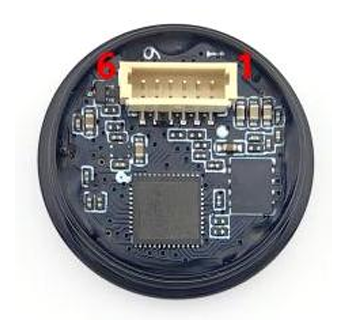
端子规格:SH1.0*6Pin
| 引脚 | 名称 | 功能描述 |
|---|---|---|
| 1 | VCC | 3.3V 电源输入(400mA) |
| 2 | UART_TX | 串口发送信号(TTL 电平) |
| 3 | UART_RX | 串口接收信号(TTL 电平) |
| 4 | GND | 电源和信号地 |
| 5 | D- | USB 数据接收 |
| 6 | D+ | USB 数据发送 |
模块尺寸图
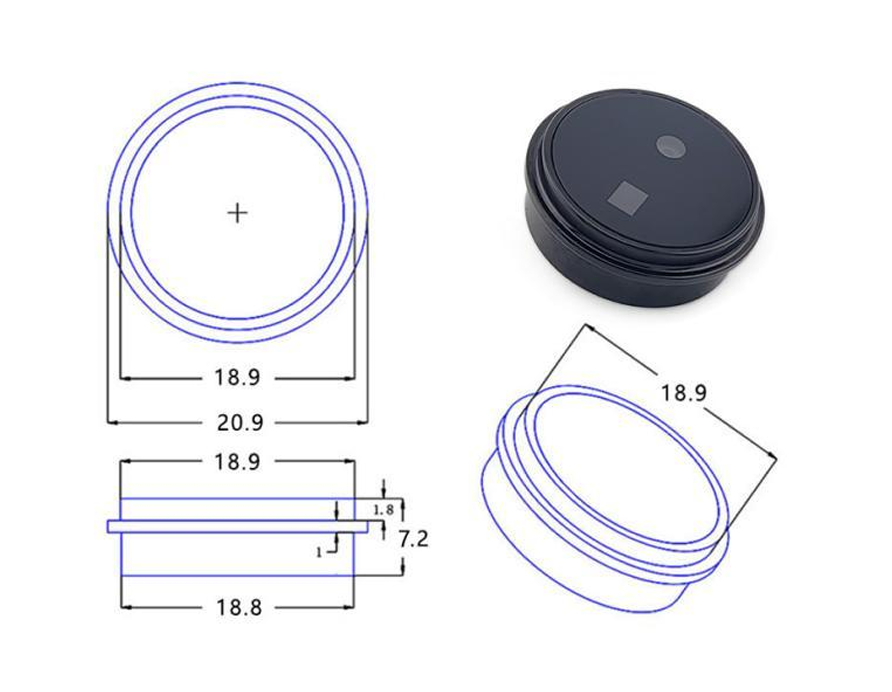
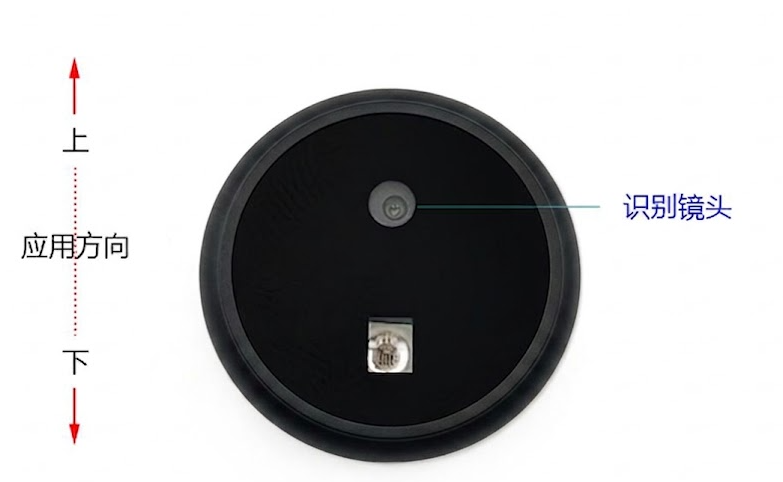
安装示意图
注:模块在安装应用时,识别镜头只能在上方位置保持水平垂直(如图), 镜头方向不可歪斜或颠倒
接入Arduino使用教程
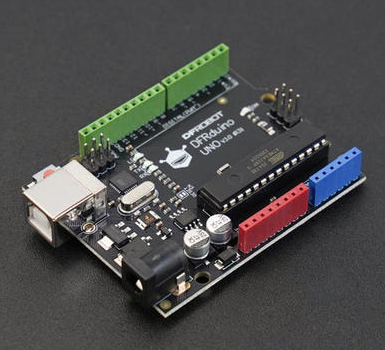
硬件准备
- Arduino UNO R3开发板 x1
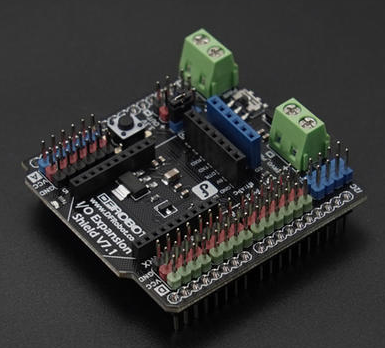
- Arduino UNO IO 传感器扩展板 x1
- FP01 离线AI视觉识别传感器(人脸&静脉掌纹) x1
- SH1.0mm转2.54杜邦连接线 x1
软件准备
- 下载Arduino IDE: 点击下载Arduino IDE
- 下载DFRobot_Biometric库
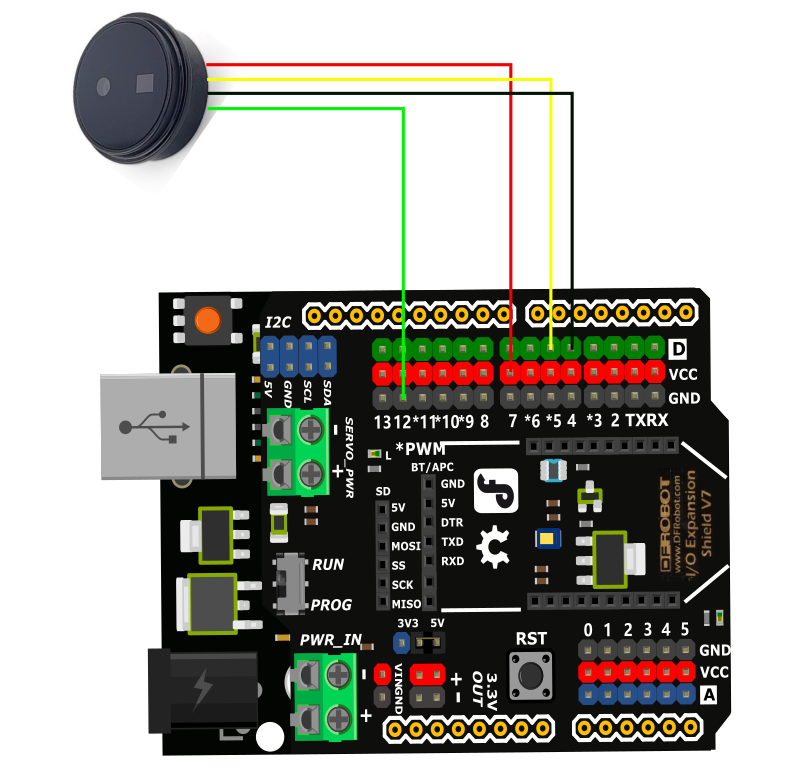
硬件连接
注册人脸&掌纹演示代码
注册人脸或者掌纹时,需要将AI视觉传感器固定,并注意识别距离,人脸30-60cm,静脉掌纹15-20cm.
输入指令:1,注册人脸用户,同一张人脸只能注册一次
输入指令:2,注册静脉掌纹用户,同一个掌纹可以重复注册,一个掌纹注册一次即可
/*!
 * @file enrollUser.ino
 * @brief Example of face or palm user enrollment for SEN0736 and SEN0737
 * @details This example performs user enrollment every time you input the command:1 (enroll face),2 (enroll palm)
 * @n and prints the enrollment result through the serial port
 * @n Enrollment should work normally as long as the connection is correct
 * @copyright Copyright (c) 2026 DFRobot Co.Ltd (http://www.dfrobot.com)
 * @license The MIT License (MIT)
 * @author [Olive](feng.yang@dfrobot.com)
 * @version V1.0.0
 * @date 2026-06-02
 * @url https://github.com/DFRobot/DFRobot_Biometric
 */

#include "DFRobot_Biometric.h"

/* -----------------------------------------------------------------------------------------------------
  *    board   |             MCU                |   Leonardo/Mega2560/M0  |   ESP8266  |     ESP32     |
  *     VCC    |            3.3V/5V             |          VCC            |    VCC     |      VCC      |
  *     GND    |              GND               |          GND            |    GND     |      GND      |
  *     RX     |              TX                |      Serial1 TX1        |    5/D6    |  Serial2 TX1  |
  *     TX     |              RX                |      Serial1 RX1        |    4/D7    |  Serial2 RX1  |
  * ----------------------------------------------------------------------------------------------------*/
/* Baud rate cannot be changed , it is 115200 */

#if defined(ESP8266) || defined(ARDUINO_AVR_UNO)
#define SOFT_RX_PIN 4
#define SOFT_TX_PIN 5
#include <SoftwareSerial.h>
SoftwareSerial ModuleSerial(SOFT_RX_PIN, SOFT_TX_PIN);
#elif defined(ESP32)
#define RX_PIN       16
#define TX_PIN       17
#define ModuleSerial Serial2
#else
#define ModuleSerial Serial1
#endif

DFRobot_Biometric face(ModuleSerial);

void setup()
{
#if defined(ESP32)
  ModuleSerial.begin(115200, SERIAL_8N1, RX_PIN, TX_PIN);
#else
  ModuleSerial.begin(115200);
#endif

  Serial.begin(115200);                   //Start serial 1, for information printing
  delay(2000);                            //Wait for module to start
  while (face.checkState() == false) {    //Determine whether the module is ready
    Serial.println("Module not ready!");
    delay(200);
  }
  Serial.println("Module ready!");

  Serial.println("----------------------------------------------------");
  Serial.println("Enter the command below through the serial port:");
  Serial.println("1     # enroll face user");
  Serial.println("2     # enroll palm user");
  Serial.println("----------------------------------------------------");
}

uint16_t                       id;
char                           faceName[]   = "face";
char                           palmName[]   = "palm";
char                           fullName[20] = { 0 };
DFRobot_Biometric::eIsAdmin_t  userclass    = face.eRoleNormal;
DFRobot_Biometric::eUserKind_t userKind     = face.eFaceUser;
uint16_t                       i = 1, j = 1;
void                           loop()
{
  char   data[11] = { 0 };
  int8_t result   = 0;

  while (!Serial.available()) {
    ;
  }
  String input = Serial.readStringUntil('\n');
  input.trim();
  input.toCharArray(data, 10);
  Serial.println("-----------------------------------------------------------------------------------------------");
  if (strcmp(data, "1") == 0 || strcmp(data, "2") == 0) {
    if (strcmp(data, "1") == 0) {
      Serial.println("Start face enrollment. Please keep your face directly facing the camera, 30cm~60cm away");
      snprintf(fullName, sizeof(fullName), "%s%d", faceName, i);
      userKind = face.eFaceUser;
      result   = face.enrollUser(userKind, fullName, &id, userclass);
    } else {
      Serial.println("Start palm enrollment. Please keep your palm directly facing the camera, 15cm~20cm away");
      snprintf(fullName, sizeof(fullName), "%s%d", palmName, j);
      userKind = face.ePalmUser;
      result   = face.enrollUser(userKind, fullName, &id, userclass);
    }
    //Determine the execution result
    if (result == 1) {
      if (strcmp(data, "1") == 0) {
        Serial.println("Face enrollment successful!");
      } else {
        Serial.println("Palm enrollment successful!");
      }
      Serial.print("the user id is:");
      Serial.println(id);
      Serial.print("the user name is:");
      Serial.println(fullName);
      Serial.print("the user kind is:");
      if (userKind == face.eFaceUser) {
        Serial.println("face user");
      } else if (userKind == face.ePalmUser) {
        Serial.println("palm user");
      }
      Serial.print("the userClass is:");
      if (userclass == face.eRoleNormal) {
        Serial.println("Normal user");
      } else if (userclass == face.eRoleAdmin) {
        Serial.println("Administrator");
      }
      if (strcmp(data, "1") == 0) {
        i++;
      } else {
        j++;
      }
    } else if (result == 2) {
      Serial.println("User already exists");
    } else if (result == 3) {
      Serial.println("Enrollment timeout");
    } else if (result == NO_ACK) {
      Serial.println("No response from module");
    } else if (result == ERROR) {
      Serial.println("Parameter range error");
    }
  } else {
    Serial.println("Error command!");
  }
  Serial.println("-----------------------------------------------------------------------------------------------");
  Serial.println("");
  Serial.println("please input next command:");
  Serial.println("");
  delay(2000);
}
结果
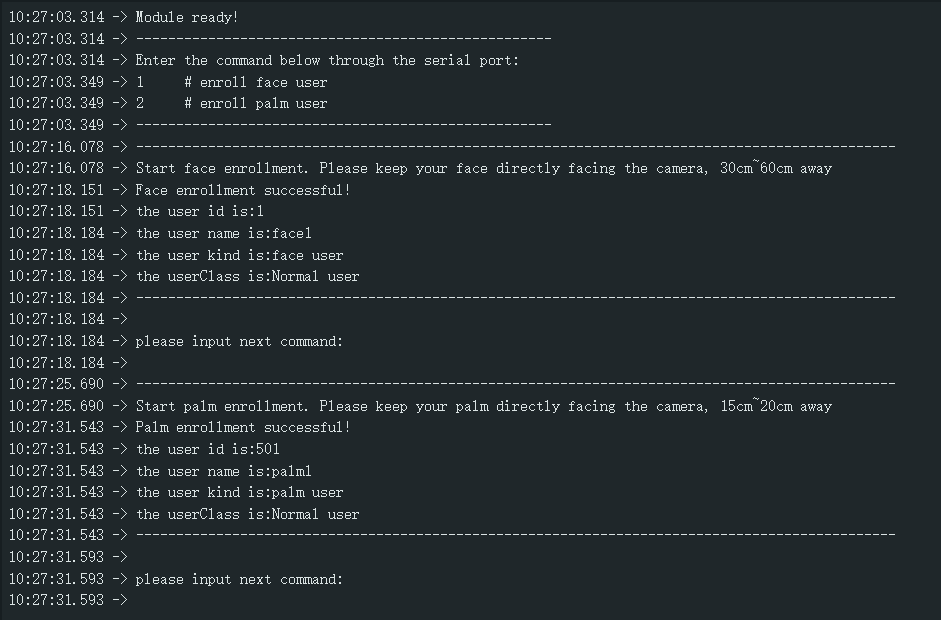
每次注册时间10S,注册成功后打印对应信息,若注册超时,输入指令重新注册即可,ID 1-500为人脸,501-800为静脉掌纹。
连续识别人脸&掌纹演示代码
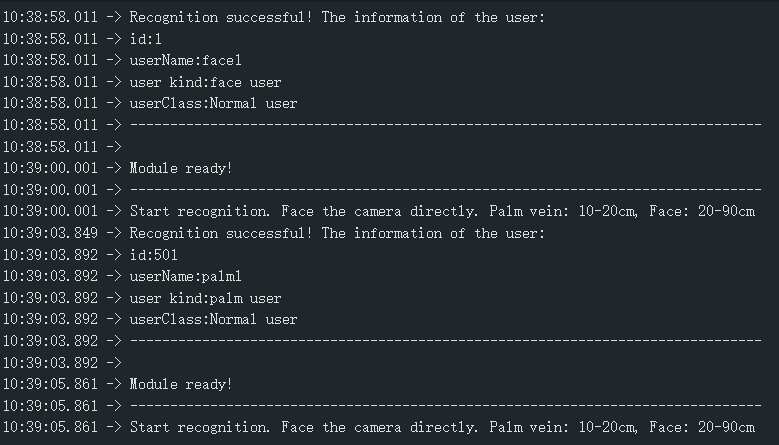
每10s识别一次人脸和掌纹,并通过串口监视器打印相应信息,识别不到时,可以小幅度调整距离或姿势,并保持不动。识别距离:人脸20-90cm,静脉掌纹10-20cm。
/*!
 * @file recognition.ino
 * @brief Continuous automatic user recognition routine for SEN0736 and SEN0737
 * @details This routine periodically detects faces, automatically recognizes them
 * @n and prints user details via the serial port.
 * @copyright Copyright (c) 2026 DFRobot Co.Ltd (http://www.dfrobot.com)
 * @license The MIT License (MIT)
 * @author [Olive](feng.yang@dfrobot.com)
 * @version V1.0.0
 * @date 2026-06-02
 * @url https://github.com/DFRobot/DFRobot_Biometric
 */

#include "DFRobot_Biometric.h"

/* -----------------------------------------------------------------------------------------------------
  *    board   |             MCU                |   Leonardo/Mega2560/M0  |   ESP8266  |     ESP32     |
  *     VCC    |            3.3V/5V             |          VCC            |    VCC     |      VCC      |
  *     GND    |              GND               |          GND            |    GND     |      GND      |
  *     RX     |              TX                |      Serial1 TX1        |    5/D6    |  Serial2 TX1  |
  *     TX     |              RX                |      Serial1 RX1        |    4/D7    |  Serial2 RX1  |
  * ----------------------------------------------------------------------------------------------------*/
/* Baud rate cannot be changed , it is 115200 */

#if defined(ESP8266) || defined(ARDUINO_AVR_UNO)
#define SOFT_RX_PIN 4
#define SOFT_TX_PIN 5
#include <SoftwareSerial.h>
SoftwareSerial ModuleSerial(SOFT_RX_PIN, SOFT_TX_PIN);
#elif defined(ESP32)
#define RX_PIN       16
#define TX_PIN       17
#define ModuleSerial Serial2
#else
#define ModuleSerial Serial1
#endif

DFRobot_Biometric face(ModuleSerial);

void setup()
{
#if defined(ESP32)
  ModuleSerial.begin(115200, SERIAL_8N1, RX_PIN, TX_PIN);
#else
  ModuleSerial.begin(115200);
#endif

  Serial.begin(115200);    //Start serial 1, for information printing
  delay(2000);             //Wait for module to start
}

void loop()
{
  // put your main code here, to run repeatedly:
  while (face.checkState() == false) {    //Determine whether the module is ready
    Serial.println("Module not ready !");
    delay(200);
  }
  Serial.println("Module ready!");
  Serial.println("-------------------------------------------------------------------------------");
  DFRobot_Biometric::sId_t user   = { 0, DFRobot_Biometric::eFaceUser, DFRobot_Biometric::eRoleNormal, { 0 } };    //Store the recognized user information
  int8_t                   result = 0;
  Serial.println("Start recognition. Face the camera directly. Palm vein: 10-20cm, Face: 20-90cm");
  result = face.getRecognitionResult(&user);
  //Determine the execution result
  if (result == 1) {
    Serial.println("Recognition successful! The information of the user:");
    Serial.print("id:");
    Serial.println(user.id);
    Serial.print("userName:");
    Serial.println(user.userName);
    Serial.print("user kind:");
    if (user.kind == face.eFaceUser) {
      Serial.println("face user");
    } else if (user.kind == face.ePalmUser) {
      Serial.println("palm user");
    }
    Serial.print("userClass:");
    if (user.isAdmin == face.eRoleNormal) {
      Serial.println("Normal user");
    } else if (user.isAdmin == face.eRoleAdmin) {
      Serial.println("Administrator");
    }
  } else if (result == 2) {
    Serial.println("User recognition timeout");
  } else if (result == NO_ACK) {
    Serial.println("No response from module");
  } else if (result == 3) {
    Serial.println("Recognized user not found");
  }
  Serial.println("-------------------------------------------------------------------------------");
  Serial.println("");
  delay(10000);
}
结果
持续识别检测到的人脸和掌纹,串口打印相应信息。
用户数量统计&用户删除演示代码
输入指令:1,查询人脸用户数量、ID和掌纹用户数量
输入指令:2,进入删除指定用户功能,再次输入任意ID号,删除指定ID
输入指令:3,删除所有已注册的用户
/*!
 * @file getDeleteId.ino
 * @brief This routine implements user lookup and deletion for SEN0736 and SEN0737
 * @details This routine sends string commands over serial to the host controller
 * @n which parses and executes the corresponding actions on the module.
 * @n Supported commands: 1 (get number of users), 2 (delete user by ID), and 3 (delete all users)
 * @copyright Copyright (c) 2026 DFRobot Co.Ltd (http://www.dfrobot.com)
 * @license The MIT License (MIT)
 * @author [Olive](feng.yang@dfrobot.com)
 * @version V1.0.0
 * @date 2026-06-02
 * @url https://github.com/DFRobot/DFRobot_Biometric
 */

#include "DFRobot_Biometric.h"
#include "string.h"
/* -----------------------------------------------------------------------------------------------------
  *    board   |             MCU                |   Leonardo/Mega2560/M0  |   ESP8266  |     ESP32     |
  *     VCC    |            3.3V/5V             |          VCC            |    VCC     |      VCC      |
  *     GND    |              GND               |          GND            |    GND     |      GND      |
  *     RX     |              TX                |      Serial1 TX1        |    5/D6    |  Serial2 TX1  |
  *     TX     |              RX                |      Serial1 RX1        |    4/D7    |  Serial2 RX1  |
  * ----------------------------------------------------------------------------------------------------*/
/* Baud rate cannot be changed , it is 115200 */

#if defined(ESP8266) || defined(ARDUINO_AVR_UNO)
#define SOFT_RX_PIN 4
#define SOFT_TX_PIN 5
#include <SoftwareSerial.h>
SoftwareSerial ModuleSerial(SOFT_RX_PIN, SOFT_TX_PIN);
#elif defined(ESP32)
#define RX_PIN       16
#define TX_PIN       17
#define ModuleSerial Serial2
#else
#define ModuleSerial Serial1
#endif

DFRobot_Biometric face(ModuleSerial);

void setup()
{
#if defined(ESP32)
  ModuleSerial.begin(115200, SERIAL_8N1, RX_PIN, TX_PIN);
#else
  ModuleSerial.begin(115200);
#endif

  Serial.begin(115200);    //Start serial 1, for information printing
  delay(1500);             //Wait for module to start,
}
uint8_t j = 0;
void    loop()
{
  // put your main code here, to run repeatedly:
  while (face.checkState() == false) {    //Determine whether the module is ready
    Serial.println(" Module not ready !");
    delay(200);
  }
  //Print once on the first loop iteration
  if (j++ < 1) {
    Serial.println(" Module ready !");
    //Command Introduction
    Serial.println("-----------------------------");
    Serial.println("Enter the command below through the serial port:");
    Serial.println("1          # Get all user information");
    Serial.println("2          # Delete the specified user");
    Serial.println("3          # Delete all users");
    Serial.println("-----------------------------");
  }
  char     data[31] = { 0 };
  int16_t  nums     = 0;
  uint16_t userId   = 0;
  int8_t   result   = 0;
  while (!Serial.available()) {
    ;
  }
  //Read the user's command
  String input = Serial.readStringUntil('\n');
  input.trim();
  input.toCharArray(data, 30);
  //Match the command of user
  if (strcmp(data, "1") == 0) {
    nums = face.getAllNumsFaceUserIDs();
    Serial.print("face user nums:");
    Serial.println(nums);
    delay(100);
    uint16_t id[50];
    face.getAllFaceUserIDs(id, 50);
    if (nums > 0) {
      Serial.print("face user ids:");
      for (int16_t i = 0; i < nums; i++) {
        Serial.print(id[i]);
        Serial.print(" ");
      }
      Serial.println("");
      delay(100);
    }
    nums = face.getAllNumsPalmUserIDs();
    Serial.print("palm user nums:");
    Serial.println(nums);
  } else if (strcmp(data, "2") == 0) {
    Serial.println("input the id that you delete:");
    while (!Serial.available()) {
      ;
    }
    String inputString = Serial.readStringUntil('\n');
    inputString.trim();
    // Validate that the input is a pure integer
    bool validInput = (inputString.length() > 0);
    for (size_t k = 0; k < inputString.length(); k++) {
      if (!isdigit(inputString.charAt(k))) {
        validInput = false;
        break;
      }
    }
    if (!validInput) {
      Serial.println("Invalid ID");
    } else {
      userId = inputString.toInt();
      if (userId <= 500) {
        nums = face.getAllNumsFaceUserIDs();
        uint16_t id[50];
        face.getAllFaceUserIDs(id, 50);
        bool idExists = false;
        for (int16_t i = 0; i < nums; i++) {
          if (userId == id[i]) {
            idExists = true;
          }
        }
        if (idExists == true) {
          result = face.deleteUser(userId);
          if (result == 1) {
            Serial.print("Successful delete user:");
            Serial.println(userId);
          } else {
            Serial.println("Failed to delete user");
          }
        } else {
          Serial.println("The user with this ID does not exist");
        }
      } else if (userId > 500 && userId <= 800) {
        result = face.deleteUser(userId);
        if (result == 1) {
          Serial.print("Successful delete user:");
          Serial.println(userId);
        } else {
          Serial.println("Failed to delete user");
        }
      } else {
        Serial.println("The user with this ID does not exist");
      }
    }
  } else if (strcmp(data, "3") == 0) {
    result = face.deleteAllUser();
    if (result == 1) {
      Serial.println("Successful delete all user");
    } else {
      Serial.println("Failed to delete all user");
    }
  } else {
    Serial.println("ERROR command");
  }
  Serial.println("");
  Serial.println("please input next command:");
  delay(1000);
}
结果
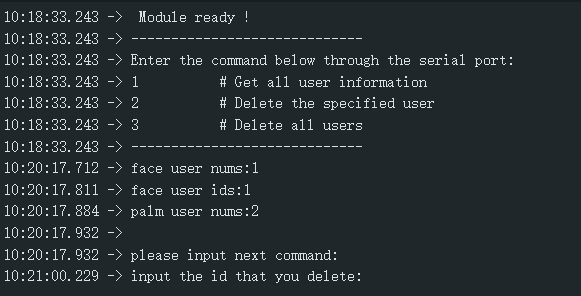
输入对应指令进行查询用户数量、删除用户等操作。
更多资料下载
常见问题
- 传感器内部具有算力芯片,工作时发热是正常现象
- 识别效果不佳时,模块应保持不动,只调整人脸和掌纹的距离和角度
- 在进行注册和识别人脸掌纹时,角度和姿势应保持一致,识别效率更高
