简介
C4002是一款基于24GHz FMCW技术的毫米波雷达模块,专为智能家居场景中需要精准静态人体存在感知的应用而设计。模块突破了传统PIR传感器只能检测大幅运动的局限,可在10x10m的有效检测范围内,同步侦测运动人体与静止(微动)人体,并支持运动速度检测、运动方向识别(靠近/远离)及环境光检测功能。模块具备探测范围可调功能,通过底噪采集智能过滤环境干扰,输出模式灵活可配置,是智能家居产品方案实现真无人感控系统的理想核心部件。
宽范围多状态检测,支持IO可控输出
凭借10x10m的有效检测范围,C4002可全面覆盖整个房间。无论是行走中的大幅运动,还是静止不动的微动,模块均能检测输出,还可通过OUT接口的可配置输出模式(如存在、运动、静止(微动)状态),直接控制外部设备,确保仅在“真正有人”时运行,提升便利性与节能效率。
智能抗干扰,稳定可靠免调试
模块内置环境底噪采集功能,在新环境中可自动学习并建立背景噪声模型,有效过滤窗帘摆动、空调运行、绿植摇晃等常见干扰,大幅降低误报率,保证系统长期稳定运行。
探测范围灵活可调,适应各种探测场景需求
您可以根据实际应用需要,灵活调节检测范围。无论是大客厅的整体监测,还是小卫生间的定点感知,均可通过调节探测边界智能契合,灵活适应各种空间布局。
开发生态与兼容性
C4002完美兼容 Arduino、ESP32 、树莓派主流开源硬件平台,并可轻松集成至 Home Assistant 智能家居系统。凭借丰富的资源,能够快速实现功能验证与系统集成,极大缩短研发周期。
产品特性
- 高探测能力:运动检测距离达 11m,静止/微动检测距离达 10m,探测角度为 120°×120°,覆盖范围广。
- 智能干扰过滤:内置环境底噪采集与学习功能,能有效过滤窗帘摆动、空调运行等环境干扰,大幅降低误报率。
- 多维度信息输出:除运动、静止/微动状态外,还支持运动速度检测、运动方向识别(靠近/远离)及环境光检测。
规格参数
- 工作电压:3.6~5.5V
- 检测能力:运动、微动/静止人体
- 最大检测距离:运动11m、微动/静止10m
- 探测角度:120°x120°
- 输出接口:OUT(可配置IO),UART
- 工作频率:24GHz~24.25GHz
- 光线检测:0~50lux
- 工作温度:-20~85℃
- 产品尺寸:22mm x 26mm
探测范围
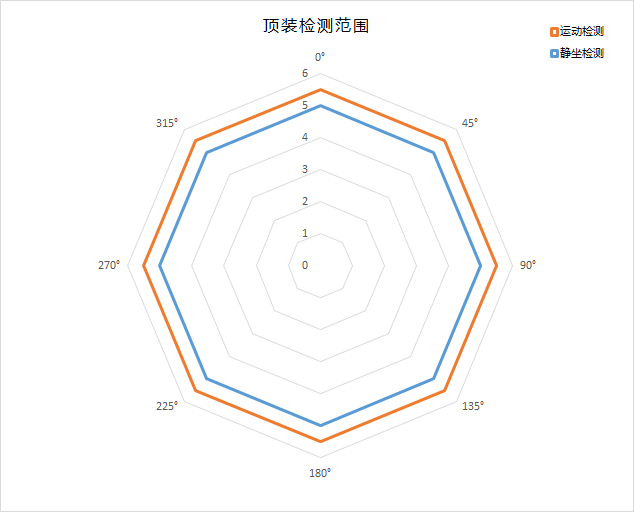
C4002模块顶装检测范围图(安装高度2.7m)
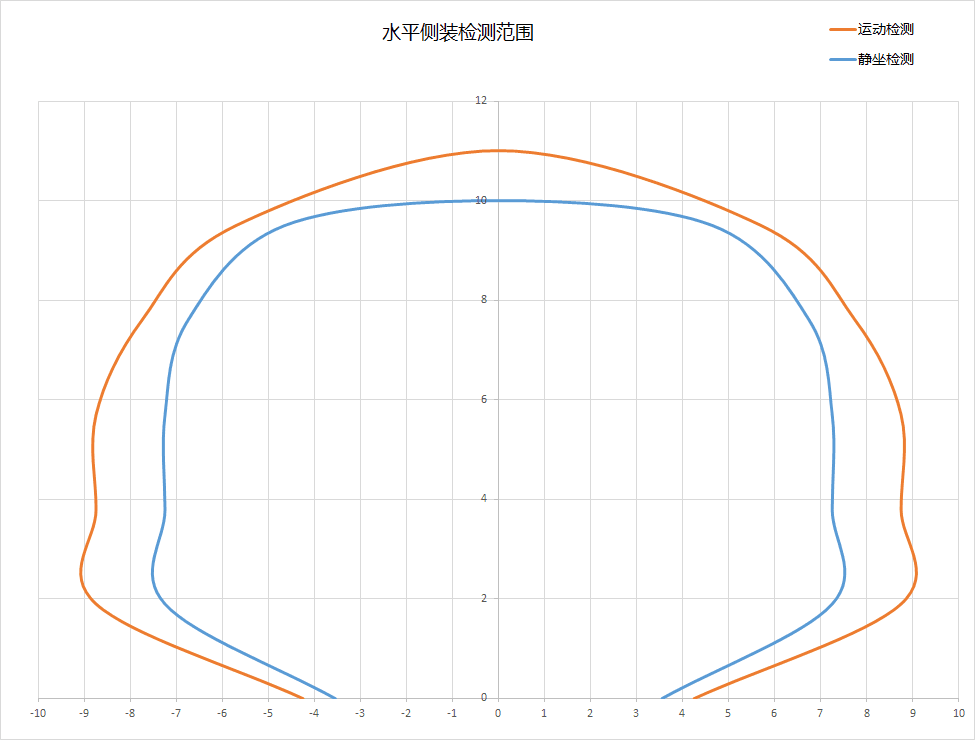
C4002模块水平侧装检测范围图(安装高度1.2m)
引脚说明
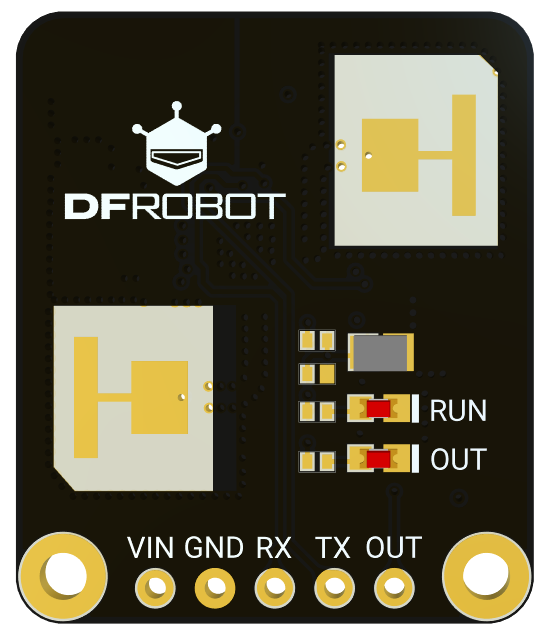
| 引脚 | 功能描述 |
|---|---|
| VIN | DC 3.6-5.5V输入 |
| GND | 接地 |
| RX | 传感器串口接收 |
| TX | 传感器串口发送 |
| OUT | 电平输出 |
使用教程
软硬件准备
硬件准备
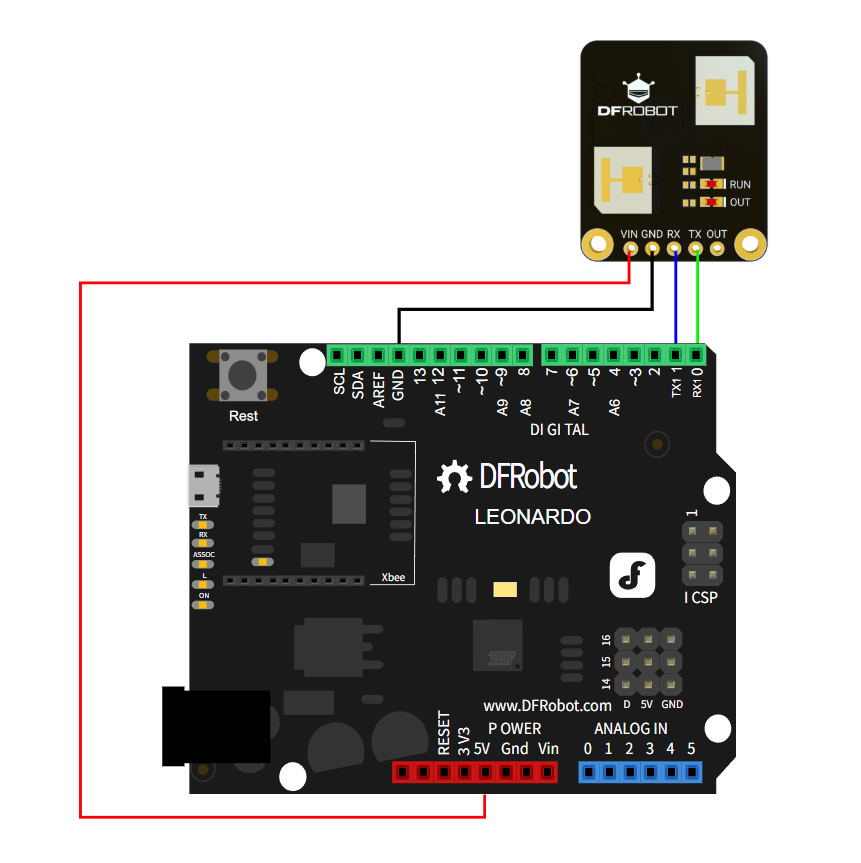
- DFRobot Leonardo (SKU:DFR0221) ×1
- C4002(SKU:SEN0690)×1
软件准备
- 下载Arduino IDE: 点击下载Arduino IDE
- 下载C4002库: 点击下载DFRobot_C4002
接线图
示例代码
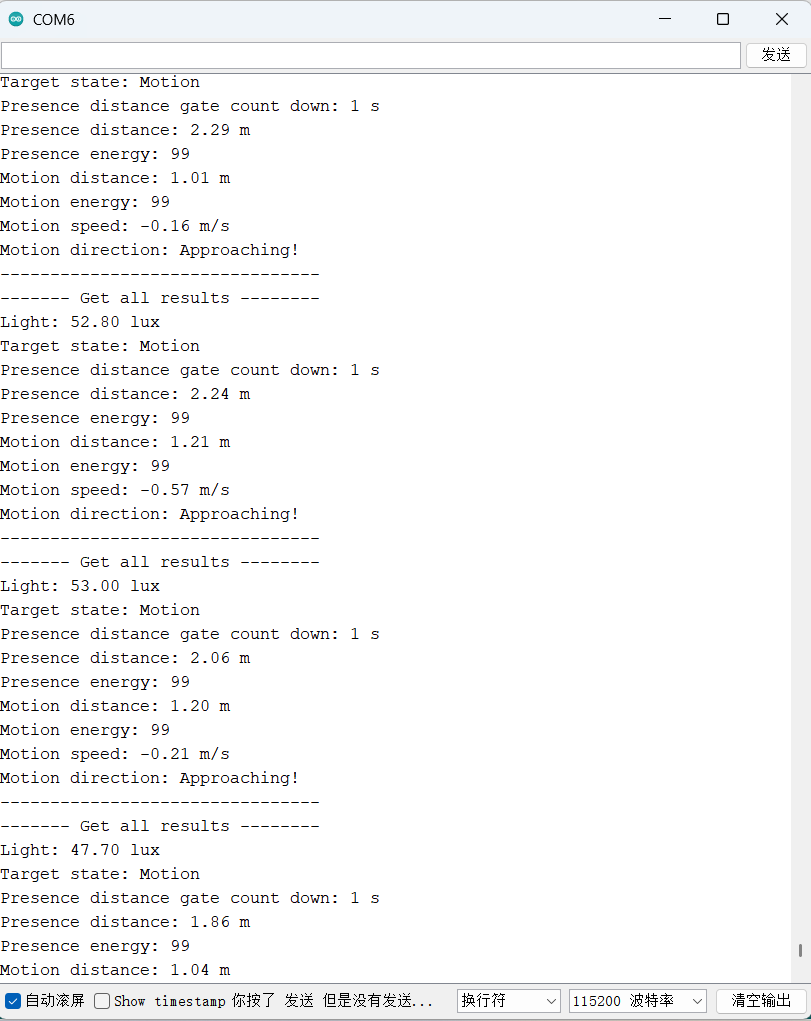
- 烧录以下示例代码通过串口监视器查看数值
/*!
 * @file getAllResults.ino
 * @brief This is an example to show how to use the DFRobot_C4002 library to get all the results of the C4002 sensor.
 * @copyright	Copyright (c) 2025 DFRobot Co.Ltd (http://www.dfrobot.com)
 * @license The MIT License (MIT)
 * @author JiaLi(zhixin.liu@dfrobot.com)
 * @version V1.0
 * @date 2025-11-04
 * @url https://github.com/DFRobot/DFRobot_C4002
 */
#include "DFRobot_C4002.h"

/* ---------------------------------------------------------------------------------------------------------------------
  *    board   |             MCU                | Leonardo/Mega2560/M0 |    UNO    | ESP8266 | ESP32 |  microbit  |   m0  |
  *     VCC    |              5V                |         5V           |     5V    |    5V   |   5V  |     X      |   5V  |
  *     GND    |              GND               |        GND           |    GND    |   GND   |  GND  |     X      |  GND  |
  *     RX     |              TX                |     Serial1 TX1      |     5     |   5/D6  | 25/D2 |     X      |  tx1  |
  *     TX     |              RX                |     Serial1 RX1      |     4     |   4/D7  | 26/D3 |     X      |  rx1  |
  * ----------------------------------------------------------------------------------------------------------------------*/
/* Baud rate can be changed */

#if defined(ESP8266) || defined(ARDUINO_AVR_UNO)
SoftwareSerial mySerial(4, 5);
DFRobot_C4002  c4002(&mySerial, 115200);
#elif defined(ESP32)
DFRobot_C4002 c4002(&Serial1, 115200, /*D2*/ D2, /*D3*/ D3);
#else
DFRobot_C4002 c4002(&Serial1, 115200);
#endif

void setup()
{
  Serial.begin(115200);

  // Initialize the C4002 sensor
  while (c4002.begin() != true) {
    Serial.println("C4002 begin failed!");
    delay(1000);
  }
  Serial.println("C4002 begin success!");
  delay(50);

  // Set the run led to off
  if (c4002.setRunLedState(eLedOff)) {
    Serial.println("Set run led success!");
  } else {
    Serial.println("Set run led failed!");
  }
  delay(50);

  // Set the out led to off
  if (c4002.setOutLedState(eLedOff)) {
    Serial.println("Set out led success!");
  } else {
    Serial.println("Set out led failed!");
  }
  delay(50);

  // Set the Resolution mode to 80cm.
  if (c4002.setResolutionMode(eResolution80Cm)) {
    Serial.println("Set resolution mode success!");
  } else {
    Serial.println("Set resolution mode failed!");
  }
  delay(50);
  /**
   * Note:
   * 1. eResolution80Cm: This indicates that the resolution of the "distance gate" is 80cm.
   *  With a resolution of 80 cm, it supports up to 15 distance gates, with a maximum distance of 11.6 meters.
   * 2. eResolution20Cm: This indicates that the resolution of the "distance gate" is 20cm.
   *  With a resolution of 20 cm, it supports up to 25 distance gates, with a maximum distance of 4.9 meters
  */

  // Set the detect range to 0-1100 cm
  uint16_t clostRange = 0;
  uint16_t farRange   = 1100;
  if (c4002.setDetectRange(clostRange, farRange)) {    // Max detect range(0-1100cm)
    Serial.println("Set detect range success!");
  } else {
    Serial.println("Set detect range failed!");
  }
  delay(50);

  // Set the light threshold to 0 lux.range: 0-50 lux
  if (c4002.setLightThresh(0)) {
    Serial.println("Set light threshold success!");
  } else {
    Serial.println("Set light threshold failed!");
  }
  delay(50);

  uint8_t gateState[15] = { C4002_ENABLE, C4002_ENABLE, C4002_ENABLE, C4002_ENABLE, C4002_ENABLE, C4002_ENABLE, C4002_ENABLE, C4002_ENABLE, C4002_ENABLE, C4002_ENABLE, C4002_ENABLE, C4002_ENABLE, C4002_ENABLE, C4002_ENABLE, C4002_ENABLE };
  // Resolution mode:eResolution20Cm,This means that the number of 'distance gates' we can operate is 25
  // uint8_t gateState[25] = {C4002_DISABLE,C4002_DISABLE,C4002_ENABLE,...,C4002_ENABLE,C4002_DISABLE};
  if (c4002.configureGate(eMotionDistGate, gateState)) {    // Operation motion distance gate
    Serial.println("Enable motion distance gate success!");
  }
  delay(50);
  if (c4002.configureGate(ePresenceDistGate, gateState)) {    // Operation presence distance gate
    Serial.println("Enable presence distance gate success!");
  }
  delay(50);

  // Set the target disappear delay time to 1s,range: 0-65535s
  if (c4002.setTargetDisappearDelay(1)) {
    Serial.println("Set target disappear delay time success!");
  } else {
    Serial.println("Set target disappear delay time failed!");
  }
  delay(50);

  // Set the report period to 10 * 0.1s = 1s
  if (c4002.setReportPeriod(10)) {
    Serial.println("Set report period success!");
  } else {
    Serial.println("Set report period failed!");
  }
  /* note: Calibration and obtaining all data must have a set cycle */
}

void loop()
{
  // Get all the results of the C4002 sensor,Default loop execution
  sRetResult_t retResult = c4002.getNoteInfo();

  if (retResult.noteType == eResult) {
    Serial.println("------- Get all results --------");
    // get the light intensity
    float light = c4002.getLightIntensity();
    Serial.print("Light: ");
    Serial.print(light);
    Serial.println(" lux");

    // get Target state
    eTargetState_t targetState = c4002.getTargetState();
    Serial.print("Target state: ");
    if (targetState == eNoTarget) {
      Serial.println("No Target");
    } else if (targetState == ePresence) {
      Serial.println("Static Presence");
    } else if (targetState == eMotion) {
      Serial.println("Motion");
    }

    // get presence count down
    uint16_t presenceGateCount = c4002.getPresenceCountDown();
    Serial.print("Presence distance gate count down: ");
    Serial.print(presenceGateCount);
    Serial.println(" s");

    // get Presence distance gate target info
    sPresenceTarget_t presenceTarget = c4002.getPresenceTargetInfo();
    Serial.print("Presence distance: ");
    Serial.print(presenceTarget.distance);
    Serial.println(" m");
    Serial.print("Presence energy: ");
    Serial.println(presenceTarget.energy);

    // get motion distance gate index
    sMotionTarget_t motionTarget = c4002.getMotionTargetInfo();
    Serial.print("Motion distance: ");
    Serial.print(motionTarget.distance);
    Serial.println(" m");
    Serial.print("Motion energy: ");
    Serial.println(motionTarget.energy);
    Serial.print("Motion speed: ");
    Serial.print(motionTarget.speed);
    Serial.println(" m/s");
    Serial.print("Motion direction: ");
    if (motionTarget.direction == eAway) {
      Serial.println("Away!");
    } else if (motionTarget.direction == eNoDirection) {
      Serial.println("No Direction!");
    } else if (motionTarget.direction == eApproaching) {
      Serial.println("Approaching!");
    }
    Serial.println("--------------------------------");
  }
  delay(50);
}
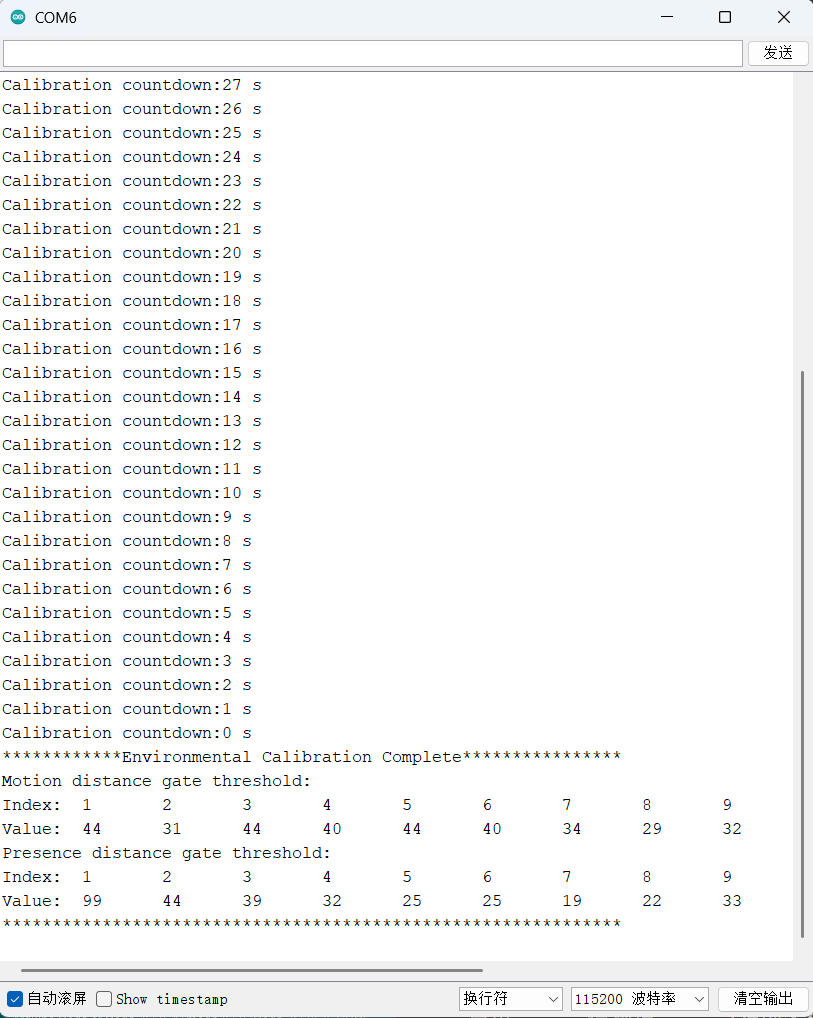
- 烧录以下示例代码后需在10s内离开房间等待40s环境底噪采集完成,可通过串口监视器查看环境底噪采集阈值
/*!
 * @file autoEnvCalibration.ino
 * @brief This is an example to demonstrate how to use the DFRobot_C4002 library to perform environmental calibration.
 * @copyright	Copyright (c) 2025 DFRobot Co.Ltd (http://www.dfrobot.com)
 * @license The MIT License (MIT)
 * @author JiaLi(zhixin.liu@dfrobot.com)
 * @version V1.0
 * @date 2025-11-04
 * @url https://github.com/DFRobot/DFRobot_C4002
 */

#include "DFRobot_C4002.h"

/* ---------------------------------------------------------------------------------------------------------------------
  *    board   |             MCU                | Leonardo/Mega2560/M0 |    UNO    | ESP8266 | ESP32 |  microbit  |   m0  |
  *     VCC    |              5V                |         5V           |     5V    |    5V   |   5V  |     X      |   5V  |
  *     GND    |              GND               |        GND           |    GND    |   GND   |  GND  |     X      |  GND  |
  *     RX     |              TX                |     Serial1 TX1      |     5     |   5/D6  | 25/D2 |     X      |  tx1  |
  *     TX     |              RX                |     Serial1 RX1      |     4     |   4/D7  | 26/D3 |     X      |  rx1  |
  * ----------------------------------------------------------------------------------------------------------------------*/
/* Baud rate can be changed */

#if defined(ESP8266) || defined(ARDUINO_AVR_UNO)
SoftwareSerial mySerial(4, 5);
DFRobot_C4002  c4002(&mySerial, 115200);
#elif defined(ESP32)
DFRobot_C4002 c4002(&Serial1, 115200, /*D2*/ D2, /*D3*/ D3);
#else
DFRobot_C4002 c4002(&Serial1, 115200);
#endif

// printDoorThreshold function
void printDoorThreshold(uint8_t *gateData, uint8_t n)
{
  Serial.print("Index:\t");
  for (int i = 0; i < n; i++) {
    Serial.print(i + 1);
    Serial.print('\t');
  }
  Serial.println();
  Serial.print("Value:\t");
  for (int i = 0; i < n; i++) {
    Serial.print(gateData[i]);
    Serial.print('\t');
  }
  Serial.println();
}

void setup()
{

  Serial.begin(115200);

  // Initialize the C4002 sensor
  while (c4002.begin() != true) {
    Serial.println("C4002 begin failed!");
    delay(1000);
  }
  Serial.println("C4002 begin success!");

  // Turn on the run led and out led
  if (c4002.setRunLedState(eLedOn)) {
    Serial.println("Set run led success!");
  } else {
    Serial.println("Set run led failed!");
  }
  delay(50);
  if (c4002.setOutLedState(eLedOn)) {
    Serial.println("Set out led success!");
  } else {
    Serial.println("Set out led failed!");
  }

  delay(3000);
  // Set the report period to 1s
  if (c4002.setReportPeriod(10)) {
    Serial.println("Set report period success!");
  } else {
    Serial.println("Set report period failed!");
  }
  /* note: Calibration and obtaining all data must have a set cycle */

  // Start environmental calibration
  // Delay time:10s ,Calibration time:30s( 15-65535 s )
  c4002.startEnvCalibration(10, 30);
  Serial.println("Start environmental calibration:");
  /**
   * Note:
   * 1. The calibration process takes about 30 seconds, and the delay time is 10 seconds.
   * 2. When resetting the development board, please find an open area to calibrate it
   * 3. When starting the calibration, there should be no one on either side of the sensor
   *  directly in front of the transmitter, otherwise it will affect the calibration accuracy
   *  of the sensor
   */
}

void loop()
{
  uint8_t           gateData[25] = { 0 };
  eResolutionMode_t resolutionMode;
  //Obtain the calibration results
  sRetResult_t retResult = c4002.getNoteInfo();

  if (retResult.noteType == eCalibration) {
    Serial.print("Calibration countdown:");
    Serial.print(retResult.calibCountdown);
    Serial.println(" s");
    if (retResult.calibCountdown == 0) {
      resolutionMode = c4002.getResolutionMode();
      int n          = resolutionMode == eResolution80Cm ? 15 : 25;
      Serial.println("************Environmental Calibration Complete****************");
      if (c4002.getDistanceGateThresh(eMotionDistGate, gateData)) {
        Serial.println("Motion distance gate threshold:");
        printDoorThreshold(gateData, n);
      } else {
        Serial.println("Get motion distance failed!");
      }
      if (c4002.getDistanceGateThresh(ePresenceDistGate, gateData)) {
        Serial.println("Presence distance gate threshold:");
        printDoorThreshold(gateData, n);
      } else {
        Serial.println("Get presence distance failed!");
      }
      Serial.println("**************************************************************");
    }
  }
}
Home Assistant使用教程
常见问题
- Q: 环境底噪采集后传感器输出异常
- A: 通常可按以下步骤进行排查:
1、检查当前采集的底噪阈值是否在正常范围内:
若阈值高于50,说明环境可能存在较大干扰源,建议对周边环境进行初步检查。
若阈值达到99,则表示环境存在强烈干扰,传感器很可能无法正常工作,输出易出现异常。
2、针对高阈值情况,应彻底排查环境中的干扰源,排除干扰后再重新进行底噪采集,以确保传感器输出恢复正常。
